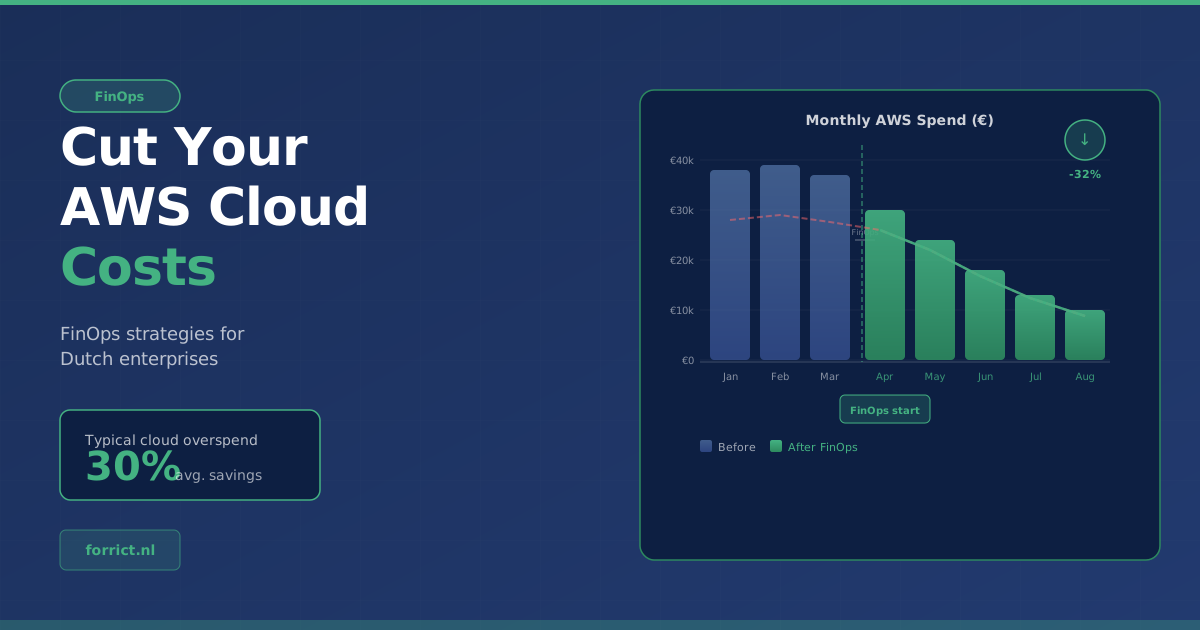
You’re probably overspending on AWS by 30%. Here’s how we help clients fix it.
We ran a cost review for a small-size Dutch company last quarter. They were spending €15K/month on AWS. Within six weeks, we cut that by €4K/month, and most of the changes were embarrassingly simple.
Cloud waste doesn’t come from a single bad decision. It’s a thousand small ones compounding over time. An engineer picks m5.xxlarge because it worked last project. A test environment stays running over the weekend. An old snapshot lingers because nobody knows if it’s still needed. Multiply that across fifty teams, and you’ve got a serious budget leak.
According to Flexera’s State of the Cloud Report, enterprises waste roughly 30% of their cloud spend. For Dutch enterprises running €200K-500K/month on AWS, that’s real money. And most of it is fixable without touching a single line of application code.
Nobody owns the bill
AWS pricing is genuinely complex. Over 300 services, each with their own pricing dimensions: per hour, per GB, per request, per million API calls. But complexity isn’t the root cause of overspending. Lack of ownership is.
We see the same three patterns in almost every engagement:
- No tagging strategy. Without consistent resource tags, costs can’t be attributed to teams or projects. The AWS bill is just one big number that nobody feels responsible for.
- Dev/test running 24/7. That staging cluster running nights and weekends? It’s burning 65% of its budget on empty hours.
- Default instance sizes. Engineers default to what worked before. Nobody checks whether t3.medium handles the actual load just fine.
These aren’t engineering failures. They’re organizational gaps. And they need organizational solutions.
Quick wins: where the easy money is
Before we talk about culture change (stay with us, we’ll keep it practical), here are the moves that deliver savings fast.
Kill the zombies
Every AWS account has them. Unattached EBS volumes. Idle Elastic IPs. Forgotten load balancers. Snapshots from instances deleted months ago. AWS won’t clean these up for you. They’ll just keep billing.
Orphaned resources are both a security risk and a money drain, and they’re surprisingly common, even in well-managed environments. We put together a free script that surfaces the most common offenders in minutes. [Grab it here →]
A systematic zombie sweep typically saves 5-15% of total spend. That’s the kind of return where you wonder why you didn’t do it sooner.
Right-size your compute
Gartner estimates 40% of cloud instances are at least one size larger than the workload requires. AWS Compute Optimizer can show you exactly where.
But right-sizing isn’t just about going smaller. Sometimes you need a different instance family entirely. CPU-bound workloads belong on c5 or c7g, not general purpose m5. Data-heavy applications might need r5. And Graviton-based instances (m7g, c7g, r7g) deliver roughly 20% better price-performance across the board. Same workload, lower bill.
| Optimization | Typical Savings | Effort |
|---|---|---|
| Zombie resource cleanup | 5-15% of total spend | Low, scripted audit |
| Instance right-sizing | 10-30% on compute | Medium, requires utilization data |
| Savings Plans (baseline) | 25-40% on committed workloads | Medium, commitment analysis |
| Non-prod scheduling | Up to 65% on dev/test compute | Low, Instance Scheduler setup |
Commit where it makes sense
Savings Plans and Reserved Instances can save up to 72% versus On-Demand pricing. The catch: you’re committing to a usage level for 1-3 years. That scares people.
It shouldn’t. The trick is to commit conservatively. Look at your usage floor, the baseline you hit even at 3 AM on a Sunday. Cover that with Compute Savings Plans for maximum flexibility. Layer in EC2 Instance Savings Plans only for workloads you’re confident won’t change. Keep the variable portion On-Demand or Spot.
We’ve seen enterprises leave six figures on the table annually because they were afraid to commit. Don’t be one of them.
Schedule non-production environments
This one’s almost too easy. That acceptance environment doesn’t need to run at 2 AM on Sunday. AWS Instance Scheduler lets you define operating windows (Monday to Friday, 07:00-19:00) and automatically stops and starts EC2 and RDS instances.
For a typical dev/test setup, that’s 65% fewer running hours. Across multiple environments, the savings compound quickly.
Structural wins: the changes that actually stick
Quick wins are satisfying. But if the same waste patterns creep back every quarter, you haven’t solved the problem.
Tags are everything
Tags are the foundation of cloud cost management. Without them, you literally cannot answer “which team is spending what on which project.”
At minimum, every resource needs:
- Environment — production, staging, development
- Team/Owner — who’s accountable
- Project/Cost Center — where to allocate the cost
- Application — what system it belongs to
Don’t make tagging optional. Use AWS Organizations SCPs and Tag Policies to enforce compliance at deploy time, or Inherit them from the AWS Account. Set tagging rules in the CDK and Terraform templates, so teams can’t deploy untagged resources even if they try.
Make costs visible to the people spending them
Once tagging is solid, use AWS Cost and Usage Reports (CUR) to build team-level dashboards. When engineering leads see their team’s AWS spend updating daily, not buried in a monthly finance PDF, behaviour changes on its own.
This isn’t about blame. It’s about ownership. Teams that see their costs make better architecture decisions.
The FinOps maturity path
The FinOps Foundation breaks this into three stages, and it’s a useful mental model:
- Crawl: Visibility. Tagging, Cost Explorer dashboards, a spending baseline.
- Walk: Active optimization. Savings Plans purchased, monthly right-sizing reviews, automated scheduling. Cost KPIs per team.
- Run: Cost as an engineering metric. Teams factor cost into every architecture decision. Unit economics (cost per transaction, cost per customer) drive optimization.
Most Dutch enterprises we work with are between Crawl and Walk. That’s fine. The biggest savings happen in that exact transition.
Why this hits different in the Netherlands
The Netherlands leads Europe in cloud adoption. CBS data shows 65-70% of Dutch enterprises use cloud services, compared to an EU average of around 45%. More cloud adoption means more spending, and more potential waste at scale.
On top of that, the regulatory landscape adds cost pressure. GDPR, NIS2 for critical infrastructure, DORA for financial services. Every compliance tool, audit log, and security scan running in your AWS environment has a price tag. If you’re not managing these costs deliberately, they spiral fast.
And then there’s the sovereignty question. Many Dutch enterprises require EU-based hosting, typically AWS eu-west-1 (Ireland) or eu-central-1 (Frankfurt). Cross-region data transfer isn’t free. Regional pricing varies. These are real cost dimensions that deserve deliberate optimization.
How we do FinOps at Forrict
We don’t do one-time cost audits. We’ve seen what happens: savings last a quarter, then drift back to baseline because nobody’s watching.
Our approach is continuous FinOps embedded in your AWS operations:
- Baseline assessment. We analyze current spend, identify waste, and build a prioritized roadmap. Not a 50-page PDF gathering dust, a ranked action list with expected savings per item.
- Quick wins first. Zombies, right-sizing, scheduling. These typically deliver 20-30% savings within the first month and build momentum for the structural work.
- Structural implementation. Tagging strategy, cost allocation, Savings Plans purchasing, automated enforcement. All built into your Landing Zone so they’re on by default.
- Continuous optimization. Monthly cost reviews, anomaly alerts, architecture recommendations. FinOps isn’t a project that ends. It’s a practice that compounds.
Everything we build, you own. The dashboards, the automation, the CDK, Terraform modules. It’s your code, in your repository. We’re not locking you into a cost management platform. We’re building the capability inside your organization.
What the numbers look like
For a mid-size Dutch enterprise spending €200K-500K/month on AWS:
| Optimization Area | Monthly Savings |
|---|---|
| Zombie cleanup + scheduling | €20K-75K |
| Right-sizing + Graviton migration | €20K-100K |
| Savings Plans optimization | €50K-150K |
| Combined first-year impact | €300K-1.2M annually |
These ranges align with what AWS FinOps practitioners consistently report across mid-size European enterprises. Your mileage will vary, but the direction is always the same.
Not sure where to start?
Book a free 30-minute AWS Waste Scan. Share read-only Cost Explorer access beforehand and we’ll come prepared with your three biggest savings opportunities — no fluff, no sales pitch. Book your free Waste Scan
Forrict is an AWS Select Tier Partner based in the Netherlands, specializing in Landing Zones, managed AWS operations, and FinOps. We help Dutch enterprises build scalable, secure cloud environments and keep the costs under control.
Forrict
AWS expert and consultant at Forrict, specializing in cloud architecture and AWS best practices for Dutch businesses.