Most of the time in bookkeeping does not go into booking, but into searching: what is still open, which invoice is missing, how do the figures of all administrations look together? With a connection between Claude and Exact Online, Claude does that searching. You check and decide.
Forrict uses this connection itself, every week, for its own administrations. We built the software behind it and made it public: Forrict/mcp-exactonline on GitHub.
How Claude reaches Exact Online
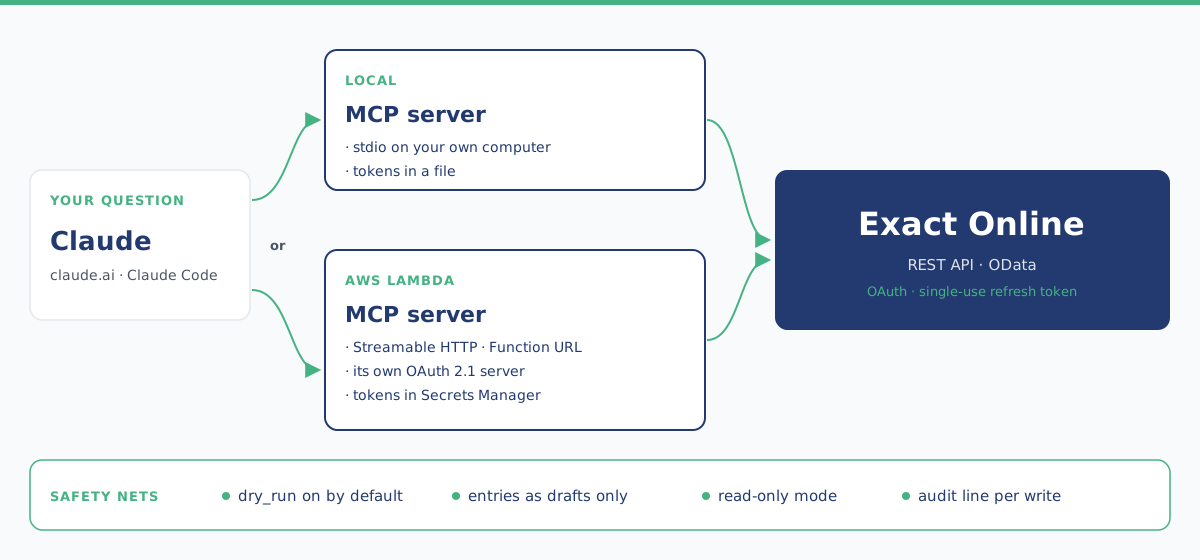
The Model Context Protocol (MCP) is an open standard that lets an AI assistant like Claude call tools in other systems. Our MCP server is the translator in between: towards Claude it speaks MCP, towards Exact it speaks the Exact Online REST API. For every question, Claude picks the tool that fits.
65
tools for Exact Online
56
of them only read
9
create something, as a preview by default
| Area | What Claude can do with it |
|---|---|
| Relations | Find, create and update customers and contacts |
| Financial | GL accounts, journals, transaction lines, outstanding receivables and payables, ageing analysis, financial periods |
| Reporting | Profit and loss and balance sheet, budgets, bank entries, payments, VAT codes |
| Sales and purchasing | Sales invoices and orders, purchase entries and orders |
| Other | Quotations, opportunities, documents, the digital inbox, projects and hours, employees, subscriptions, items and stock |
| Insights | One call for a P&L overview, a check for missing bookings, the status of bank feeds, suggestions for matching payments to invoices, and a consolidated P&L across several administrations |
What you use it for
These are the uses we rely on ourselves every week or every quarter.
Just ask a question
Without clicking through Exact
"Which customers still have to pay?" or "Are there months without purchase entries?" Claude looks up the answer in Exact itself, across several administrations too.
Group report with forecast
Several administrations in one view
Revenue and costs per month per administration, a forecast for the rest of the year and a group total in which internal invoices do not count twice. A script checks the sums.
Tracking down missing invoices
Open items next to your mailbox
Claude sorts open items: in the mail, already forwarded but not yet processed, no document needed, or really fetch it yourself. So you never hunt for invoices that are already in Exact.
Closing a quarter
Ready for the VAT return
A booking overview with the account, the VAT and the reason for each open item, based on how the same supplier was booked before. Doubt becomes a question. Easy to pass on to your accountant.
Preparing sales invoices
In last time's layout
"Invoice customer X for 1 hour and 15 minutes of consultancy for October, like last time." Claude prepares a draft invoice in the same layout. You send it yourself from Exact.
Recurring tasks that run on their own
Every week or every day
For us, a short version of the group report runs every Monday morning on its own, and new invoices are forwarded to Exact every day.
For recurring work we write down how your administration is set up, what Claude should watch for and which mistakes were made before. Every mistake Claude makes goes into that work instruction, so it does not make it a second time.
Claude looks, you decide
A connection that can reach your bookkeeping has to be locked down well. That is why these rules always apply:
| Rule | How it works |
|---|---|
| Reading is always allowed | Claude can look at everything in Exact that your account can reach. |
| Writing is a preview by default | Every write tool is in preview mode by default and only shows what it would send to Exact. |
| Drafts only | General journal entries, purchase entries and sales invoices arrive in Exact as drafts. You finalise them yourself. |
| Read-only mode | One setting removes all write tools from the list. |
| One user | After you sign in to Exact, the server checks that you are the user who has access. Otherwise nothing is stored. |
| Logging without sensitive data | Every write action is logged. The server never logs tokens or request contents. |
Two ways to run the connection
| Local | AWS Lambda | |
|---|---|---|
| For whom | Claude Desktop and Claude Code on your own computer | Claude on claude.ai and Claude Code, with nothing running on your computer |
| Connection | stdio | MCP Streamable HTTP via a Lambda Function URL |
| Tokens | A file on your computer, readable only by you | AWS Secrets Manager |
| Sign-in | Once, from the command line | When you add the connector you sign in with your Exact account, via OAuth |
Both need your own app registration in the Exact App Center. The repository on GitHub explains step by step how that works.
What Forrict does for you
1. Set up the connection
We register the app in Exact and set up the server, on your own computer or as a connector in AWS, so Claude can reach your administration securely.
2. Your workflows
Together we pick the recurring work Claude can take over, such as reports or sorting out open items, and write the work instructions for your administration.
3. Training
We teach you and your team to work with Claude, so you can add new questions and workflows yourselves.
Read more about how we use AI in small and mid-sized businesses at AI with Claude.
Frequently asked questions
Is the software free?
The code is licensed under the PolyForm Small Business License. Companies with fewer than 100 people and less than 1 million dollars in annual revenue may use it. Larger organisations can get a commercial license from Forrict.
Can Claude make bookings on its own?
Only as drafts, and only after you have seen the preview and approved it. You always finalise them yourself in Exact.
Does it work with several administrations?
Yes. You pick an administration by name or part of its name, and there is a tool for a consolidated profit and loss across several administrations.
Can I look at the code myself?
Yes, the full code is public on GitHub.
Ready to connect Claude and Exact Online?
Email info@forrict.nl and we will look together at which work in your administration Claude can take over.